Process Automation
The structured work that shouldn't need a person.
Claims pre-validation. Compliance documentation. Shift scheduling notifications. Incident report routing. Scheduled regulatory reporting. Every regulated service organisation carries a significant volume of structured, rules-based work that doesn't require human expertise but can't be left undone. Taidotech builds the automation layer that handles it reliably.
“Automation doesn't reduce headcount. It redirects the expertise of your people to the work that genuinely requires them.”Taidotech — on process automation
What this capability does
Systematic handling of structured work that currently depends on individual effort.
The administrative and compliance burden on regulated service organisations is structural, not temporary. Regulatory obligations keep adding documentation requirements, reporting obligations, and notification workflows — none of which come with additional staff. The organisations managing this best are the ones that have separated the work that requires a person from the work that doesn't, and built systems to handle the latter reliably.
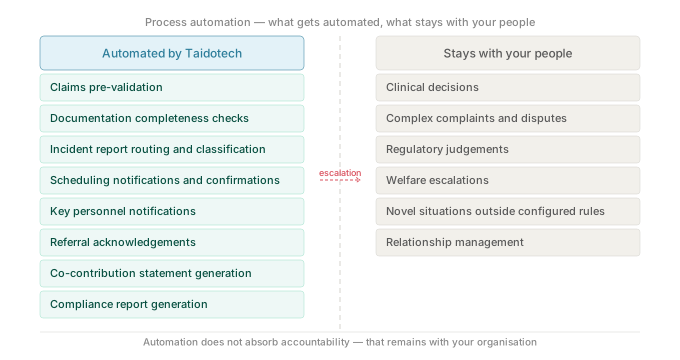
Process automation is the right tool for work that is structured, repetitive, and rules-based — where the logic is clear enough that a well-built automation will always do it correctly, and where the cost of the work being done inconsistently or not at all is real. Claims processing. Compliance notifications. Shift change communications. Incident report routing. Scheduled reporting. Documentation completeness checks.
Critically, we start with the process, not the tool. Organisations that automate poorly-designed processes get faster versions of the same problems. Taidotech always maps and fixes the process before building automation on top of it.
Our automation practice uses three primary tools, selected based on what fits the specific process: UiPath for high-volume, rules-based RPA — particularly where system integration isn't possible and screen-based automation is needed; Power Automate for workflow automation within the Microsoft 365 and Dynamics 365 ecosystem; and Azure Logic Apps for API-driven integration workflows between enterprise systems.
Every automation is built with human escalation paths — the point at which a case is too complex, too ambiguous, or too consequential for automated handling and must go to a person. Getting the escalation threshold right is as important as building the automation itself, particularly in regulated environments where the consequences of an incorrect automated outcome can be significant.
Governance is structural: every automation runs deterministically against configured rules, every run is logged, and changes to automation logic follow the same controlled process as any other software deployment.
Capability areas
Four areas within Process Automation.
The right automation tool depends on the process. We select based on fit, not preference.
Robotic Process Automation — UiPath
High-volume, rules-based automation for structured desktop and web-based tasks — data entry, system-to-system transfer, document processing, and repetitive screen-based workflows. UiPath is the right tool where API integration isn't available and where the volume and consistency of the work justifies automation investment. Taidotech builds, tests, and operates UiPath deployments with full governance and audit trail.
Power Automate and business process flows
Workflow automation within the Microsoft 365 and Dynamics 365 ecosystem — approval workflows, notification and escalation flows, document routing, case management triggers, and compliance event workflows. Power Automate is the right tool for organisations running Microsoft platforms where integration is native and the workflow logic is well-defined. Includes Power Automate Desktop for UI-based automation where needed.
Azure Logic Apps and API-driven workflows
API-driven integration and workflow automation between enterprise systems — connecting care management platforms, billing systems, scheduling tools, and communication channels through governed integration patterns. Azure Logic Apps is the right tool for complex, multi-system orchestration where reliability, monitoring, and retry logic are critical. Built for regulated environments where integration failures need to be detectable, logged, and recoverable.
Compliance documentation and reporting workflows
Automation specifically designed for the compliance and documentation burden of regulated service organisations — key personnel notification workflows, incident report routing and escalation, compliance reporting generation, documentation completeness checking, and scheduled regulatory reporting. Designed to produce the evidence trail that regulators expect to find: systematic, complete, and timestamped.
Technology
UiPath, Power Automate, and Azure Logic Apps.
Taidotech selects automation tools based on fit for the specific process and operating environment. UiPath for high-volume RPA, Power Automate for Microsoft ecosystem workflows, and Azure Logic Apps for API-driven integration — often combined within a single automation programme.
Use cases
What process automation looks like in practice.
Representative examples from regulated service environments. The right starting point is the process that's costing your team the most manual overhead right now.
What process is costing your team the most manual overhead right now?
That's usually the right place to start. Tell us what the process is, how often it runs, and what goes wrong when it isn't done well. We'll tell you honestly whether automation is the right answer — and what it would look like.
“Automating a broken process just gives you a faster version of the same problem. We fix the process first.”Taidotech — on process automation